Your Starlink experience. Now on desktop! ...because space-age internet deserves more than a mobile app.
Monitor the performance and health of your Starlink. Features live telemetry, obstruction map, speed test, latency, ping success, power draw, satellite tracking, events and outages log, alerts, and per-device data usage.
Free and open source · No account · Nothing leaves your machine · Unofficial, not affiliated with SpaceX
Dish alignment you can act on.
Dishylink lets you see the desired target rotation and tilt of your dish to accurately fine-tune it for the strongest possible signal. Its visualized so you can see at a glance whether it's aligned, and the exact nudge in degrees when it isn't.
Settle it with a real speed test
A full speed test built into the app, on demand, so you can see what the link can handle. It measures against Cloudflare, so the figure is honest rather than flattering.
- Download, upload and latency — The three that matter, plus jitter and loss for the full picture of the link's health.
- Two ways to watch it — A Starlink-styled animation or a traditional gauge — same numbers, your choice of readout.
- Run it again anytime — One tap re-runs the test, so you can watch how the link holds up minute to minute.
See every connected client device on your network
Dishylink lists every client the router can see, live and refreshed every five seconds — each named, tagged with its vendor and the band it's on. Open one for the full picture: status, signal strength and signal-to-noise, which node it's joined to, and its own live download and upload history.
Granular data usage visibility.
Every byte through the dish, split by download and upload, over any window from an hour to a month. Per-device totals name what is actually spending it — each client identified by name, vendor and type, with its own split for the billing month.
Complete energy usage visibility.
Monitor your terminal's real-time power draw and historical energy breakdowns with high-fidelity and real-time graphs. Your terminal only remembers the last few minutes, so Dishylink records around the clock and keeps the total.
Every total says how much of its period was actually recorded, so a gap never quietly pads the number.
See whether the lag is Starlink or your router
The dish and the router each time their own round trip to the internet. Dishylink reads both and charts them together, so a spike shows whether the delay is coming from Starlink or from your router network.
Know the moment something breaks
Dishylink raises an alert the moment the dish or router stops answering, overheats or runs into weather, and clears it once the problem passes. Every event lands in a log you can scroll back through, and a live status list shows the health of each component as it changes.
Direct control of your Starlink hardware.
Manage configuration for your dish and local network. Control routine maintenance, software updates, and power management with ease on supported firmware versions.
Custom DNS, bypass mode and content filtering are deliberately left out — a bad write can take your WiFi down until a physical reset.
Live throughput and notifications that work with the app closed
Turn live throughput on and the live download and upload rate sits in the macOS menu bar, or in a floating widget you can park anywhere on Windows. Turn notifications on and alerts come from macOS, Windows or your browser when app is closed — one when something breaks, another when it clears.
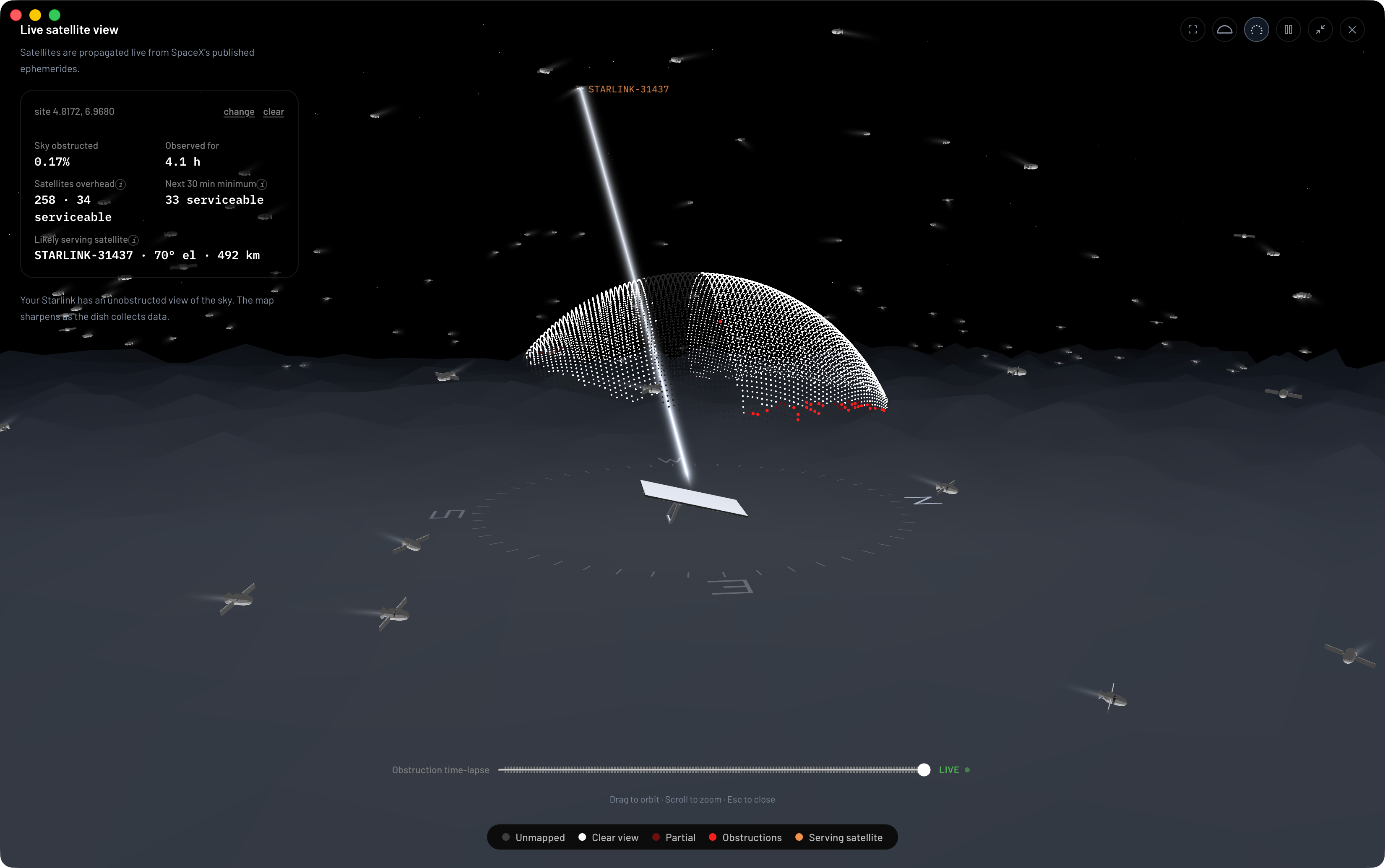
Live satellite constellation and obstruction time-lapse
See every Starlink satellite overhead, and which one your dish is communicating with, in a real-time interactive 3D scene — plus exactly where obstructions are blocking your dish's sky view and signal.
Pick where you want it
Same dashboard, same live readings, same alerts, either way you run it.
Or build it from source — it's open-source.
Frequently asked questions
Got a different question? Shoot here
Is this an official Starlink app?
No. Dishylink is an unofficial, independent project with no affiliation to SpaceX or Starlink. Starlink is a trademark of SpaceX.
Does it need an account or an internet connection?
No. Dishylink talks to your dish and router directly over your local network, so it keeps working during an outage — which is exactly when you want to see what happened. Connecting a Starlink account is optional, read-only, and only adds your plan and billing data from the cloud.
Is my telemetry sent anywhere?
Never. Everything it records is written to your own machine and stays there. No cloud sync, no analytics, no tracking, no crash reporting.
Will it work with my dish?
It reads the standard local API that Starlink terminals serve on your network, and renders the right hardware for Gen 1 through Gen 3, Mini and the Performance kits. Motorised kits additionally get stow and unstow.
What does it cost?
Nothing. It is free and open source, with no paid tier and nothing held back behind one.
If it earns its place on your machine, you can buy me a coffee or sponsor the project as a thank you!